 By
The code I write with Claude Code goes to production automatically, and every new feature goes live hidden behind an admin-only flag that only I can see. When it looks right on the real site, I say the word and it opens to everyone.
This is the Claude Code workflow I use to ship Product Moat: the flag, the file that holds the rules, the checks, and the limits I know about.
Deploy constantly, release deliberately
Deploying and releasing are two different decisions. Most setups tie them together: code goes live and users see it. That coupling makes every deploy feel risky, so people deploy less often and in bigger batches.
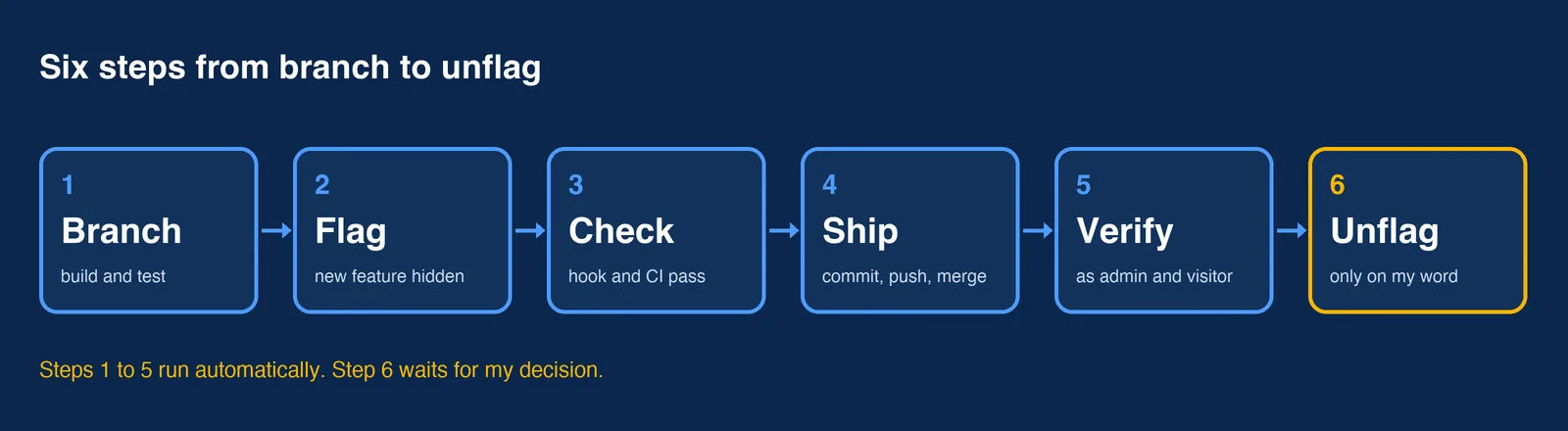
I pull them apart. I build Product Moat on my own, and most of it is backoffice that only registered users see. New code goes to production automatically, and every new feature starts hidden behind an admin-only flag. I check it on the real domain with real data. When I am happy, I tell Claude Code to unflag it and everyone sees it.
That leaves me one decision, the one that matters: when users see a feature. Commits, pushes, pull requests and merges to main follow a standing rule I wrote once, so I skip the one-by-one approvals. The next sections show how that rule is written and what keeps it safe.
Hide every new feature behind a server-side feature flag
A feature flag is a switch in the code that shows or hides a feature. Put the gate in before the first commit of a feature. A flag that only hides a button is a leak. Anyone can read the page source or call the API directly, so the server decides what to return. In Product Moat the page or the API answers 404 for anyone who is not an admin.
Admin status comes from the backoffice session. The pm_admin cookie is a hint for the interface, and middleware.js checks the session on the server before it returns anything.
Each feature gets one named flag, so I can open them one at a time. Three live in the code today:
PLAN_PUBLIChides the content distribution plan and its visuals.HERO_FLOAT_PUBLIChides the photo ribbon in the home hero.TOP_PRODUCTS_PUBLICguards the Top products page. It is now true, so the page is live.
Going live means flipping the flag through the same branch, PR and merge as any other change. Flagged features also stay out of the nav, the sitemap and search indexing for non-admins, because a hidden page that shows up in the sitemap announces itself.
Write your shipping rules where Claude Code reads them
A rule given in chat lasts one session. A rule in a file lasts. I wrote the launch rules into CLAUDE.md in the repo root, and Claude Code reads it at the start of every session. Anthropic documents this memory file in the Claude Code docs. Telling the assistant in chat is a request. Writing it in the repo is a policy.
The file holds the flow (branch, flag, check, ship, verify, unflag), the exceptions, and the list of things that still need my yes. That boundary is what makes it safe to stop confirming. The authorization is bounded: it lists what is allowed, what needs my yes and where it stops.
Two more files help. A global ~/.claude/CLAUDE.md holds personal preferences that apply to every project, and a small memory store keeps lessons learned. The rules follow the project and stay out of my memory.
Writing the rules down makes the whole Claude Code workflow repeatable, and it is also a forcing function. If I cannot state a rule in a sentence, I have not understood it well enough to delegate it.
Every delivery ends with a status block, always the last thing in the message: "Status: LIVE" or "Status: NOT LIVE" (live for everyone, live for admin only behind a flag, or not live), then "Features still hidden under a flag: N" with each flag named. Claude Code counts the flags in the code at delivery time, so the number is never stale.
Here is a real one from a recent delivery:
Status: LIVE for admin only, behind the flag
MAP_PRODUCTS_PUBLIC. It covers the map side panel products widget for pins with and without articles.Features still hidden under a flag: 2
PLAN_PUBLIC(assets/interview.js): content distribution plan and visuals.MAP_PRODUCTS_PUBLIC(app.js): highlighted products widget in the map side panel.
Let automated checks replace the approve click
Clicking approve on my own merge adds no safety when the same person reviews and approves. A standing rule plus automated checks does that job with less friction. The stack is static HTML, CSS and JavaScript with Vercel serverless functions and no build step, so the checks are small scripts. Three layers:
- Pre-commit hook.
.githooks/pre-commitis enabled bynpm install. It refuses the commit if a staged file has merge-conflict markers or if the local dev login bypass is in a deployable file. It also refreshes the cache-busting hashes and regenerates the sitemap lastmod file. - CI on every push and PR. A GitHub Actions workflow runs the offline SEO checks and confirms the cache-busting hashes are current.
- A live check after each deploy.
check:livefetches the real site and every URL in the sitemap, so it catches a deploy that did not take. I run it by hand from the Actions tab.
Deploy hygiene covers the rest. .vercelignore keeps scripts/, docs/, .githooks/, .claude/ and .env* files out of production. The /dev-login bypass lives only in the local dev server, so it cannot ship.
Two gaps are worth naming. GitHub branch protection is missing because my plan does not support it, and there is no staging environment because the flag is the staging. I also paused the Lighthouse workflow, which now runs by hand only, because it kept failing. When a check fails, Claude Code fixes the problem before it pushes.
Verify in production, then unflag on your word
After the merge, Vercel deploys main and Claude Code checks three things: the deployment succeeded, the feature is visible to me as admin, and the feature is hidden from a logged-out visitor. Then it gives me the production URL. Production is the only environment with real data, real cookies, real caching and real SEO behavior, so that is where I look.
The feature stays hidden until I say so. When I do, Claude Code flips the flag through the same branch, PR and merge and confirms it is live for everyone.
The Top products page shows how this plays out. It lists the products that product people rely on at work and after hours, ranked by how many Product Moat guests use each one. It shipped as five small pull requests, all merged between 2026-11-19 and 2026-11-20:
- Make the page public, with a sign-up at the bottom.
- Make it indexable and add it to the nav and the sitemap.
- Render the lists on the server and fix the side spacing on phones.
- Fix the live email copy so it does not promise a specific post date.
- Show the checklist expanded by default, with products minimized until the checklist is done.
Each step was small enough to review at a glance. The server rendering and the phone spacing came up because I looked at the real site.
Keep these decisions manual
Three things still need my yes, even under the standing rule, and one path ships without a flag:
- "Localhost first." When I say this, nothing goes to production until I approve. I use it for risky or visual work I want to see privately, signed in as admin through a
/dev-loginroute that only exists on my machine. If I say at the start that a session is local only, that holds for the whole session. No push, PR or merge happens, and "looks good" does not count as approval to ship. - Irreversible data changes. Schema changes, migrations and bulk edits or deletes on production data stop for a human yes. Code can be reverted. Data cannot, so the data decisions stay with me.
- Secrets. Nothing with a secret or token gets committed.
- Fixes to pages that are already live. A bug fix to a public page cannot hide behind a flag, so it ships straight to production. Only new features get flagged. Most of the risk sits here, because this path has no flag in front of it.
| What happens | Who decides |
|---|---|
| New feature | Ships flagged, admin only |
| Bug fix on a live page | Ships straight to production, no flag |
| Unflagging a feature | My word |
| Localhost-first session | My approval |
| Data migration or bulk delete | My yes |
| Secrets in a commit | Never |
Where this Claude Code workflow breaks down
This approach fits products where a small bug costs little. I would not run it on a system where people depend on uptime, or where I cannot yet vouch for quality, such as payments, health data or anything with an availability promise. Product Moat sits at the other end. A small break does not jeopardize the project or disappoint users on the spot, and I can fix things as I find them. That tolerance is the reason auto-merge makes sense here, and it is the first thing to check before you copy the setup.
So far the quality has surprised me. The code Claude Code ships has been good, and I have hit no bug or problem that argues against the approach. It is early days (I set up the workflow on 2026-11-20), so this is a first impression. A track record needs more features through the flow, and I will add numbers once they have gone through.
The other limits are easy to list:
- The server check carries the whole flag. One missed endpoint can leak a hidden feature.
- Flags pile up. Once a feature is unflagged and stable, the flag should be deleted, or old ones turn into clutter.
- It suits a solo builder or a very small team. With several engineers I would want review, CI gates and staging back.
- The rules decide the quality. If the rules file is vague, the automation will be too.
If you run a similar setup, I would like to hear which rules you wrote down and which decisions you kept manual.
What I want to try next
If you want to start tomorrow, pick one upcoming feature and put it behind a flag the server enforces. Write your shipping rules in a file your tools read every time, and list what still needs a human yes. Start that list with data changes.
Frequently asked questions
What is the difference between deploying and releasing code?
Deploying puts code on production. Releasing decides when users can see it. With a feature flag you can deploy often and release later, on your own word.
What are feature flags?
A feature flag is a switch in the code that shows or hides a feature. In my setup every new feature has its own named flag, hidden from everyone except admins until I unflag it.
Is a client-side feature flag enough to hide a feature?
No. Anyone can read the page source or call the API directly. Enforce the flag on the server, so non-admins get a 404, and keep flagged pages out of the nav, the sitemap and search indexing.
Can Claude Code push and merge to production without asking?
Yes, if you write a standing authorization in a file it reads, such as CLAUDE.md. Mine covers commits, pushes, pull requests and merges to main. Irreversible data changes, secrets and local-only sessions still need my yes.
When should you not use this workflow?
Skip it for systems where people depend on uptime, or where you cannot yet vouch for quality, such as payments or health data. It fits products where a small bug costs little and can be fixed quickly.