 By
You can connect Garmin to Claude Code with a Personal API Key from your Garmin Connect settings. One prompt gave me a full health dashboard in minutes. I had no goal beyond curiosity and fun. The dashboard itself is nothing special next to Garmin Connect, and the raw data behind it is the interesting part. Here is how I set it up, what it built and what I want to try next.
Can you connect Garmin to Claude?
Yes. Garmin Connect offers a Personal API Key for your own data, and that is what I use. An official Claude integration does not exist, so in the research I did, people use one of three setups.
- An MCP server. Claude queries Garmin live, so you can ask "how did I sleep last night?" The most popular open-source Garmin MCP server has 1.2K GitHub stars and 375 forks (TypingMind listing).
- A full data export. You request your Garmin data export, unzip it and point Claude Code at the folder. No password is involved.
- A sync script. A script copies everything into a local SQLite or Supabase database first, and Claude queries that.
The catch sits in the login. Most community tools use the unofficial python-garminconnect library, which signs in with your Garmin password, and these logins broke when Garmin changed its OAuth flow in March 2026 (Gneta). The personal key skips that password login. The export route needs no key at all, which makes it the cheapest fallback.
Pull your Garmin data with one prompt
I use the Personal API Key that Garmin Connect offers. Open your Garmin Connect settings and look for the Personal API Key link. One click creates a key that gives access to your own health and fitness data.
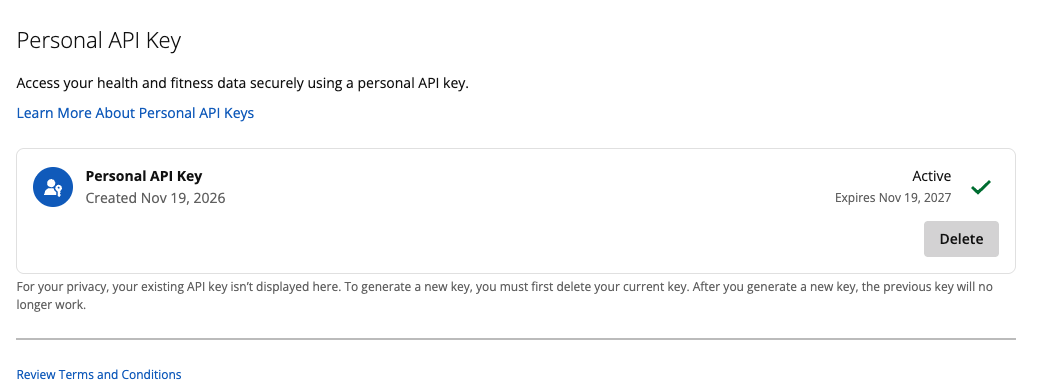
Then I pasted the key straight into a Claude Code prompt and asked it to pull my data through the API. I did that as a quick test and planned to delete the key soon after. Claude Code made the calls itself.
Four limits are worth knowing before you start:
- One key at a time. Garmin does not show an existing key again, so store it safely when you create it. To get a new one, delete the current key first, and the old key stops working.
- A one-year life. Mine was created on Nov 19, 2026 and is set to expire on Nov 19, 2027.
- Personal use only. Garmin's Personal API Supplemental Terms (last updated Oct 1, 2026) make the key yours alone, for tools you build or run for your own use. You may not sell, transfer or share it, and you answer for everything done with it. Treat it like a password and keep it out of public repos, screenshots and shared chats.
- Rate limits Garmin can change. Garmin may cap how often and how much you call the API, adjust those caps at any time, and throttle, reject or suspend requests without notice. Breaking the terms can end your access and revoke the key.
A safer way to hand over the key
A key pasted into a prompt lives in your conversation history, so that shortcut suits a short test. For anything that lasts:
- Keep the key in a password manager or the macOS Keychain, away from chat messages.
- Load it as an environment variable (for example
GARMIN_API_KEY) when your terminal starts, and tell Claude Code to read that variable. The key stays out of your prompt and your chat history. - Protect any
.envfile. Add it to.gitignore, and add a deny rule for it in your Claude Code permissions so Claude cannot read the file. - Fetch once, analyze locally. Let a small script save your data as a local file or SQLite database, and have Claude analyze that copy. It keeps your API calls low and well inside Garmin's rate limits.
- Rotate after tests. Delete the key when a test ends and create a new one when you need it. Garmin allows only one key at a time anyway.
If you prefer a route without any key, the data export from section 1 works with the same kind of prompt.
What one prompt built: a Garmin health dashboard
One prompt gave me a full dashboard in minutes. It has eight panels and a 7, 14 or 30-day range: sleep score, steps per day, stress, activities, overnight HRV, morning and afternoon heart rate, sleep duration by stage, and averages. A Refresh from Garmin button pulls fresh numbers on demand.
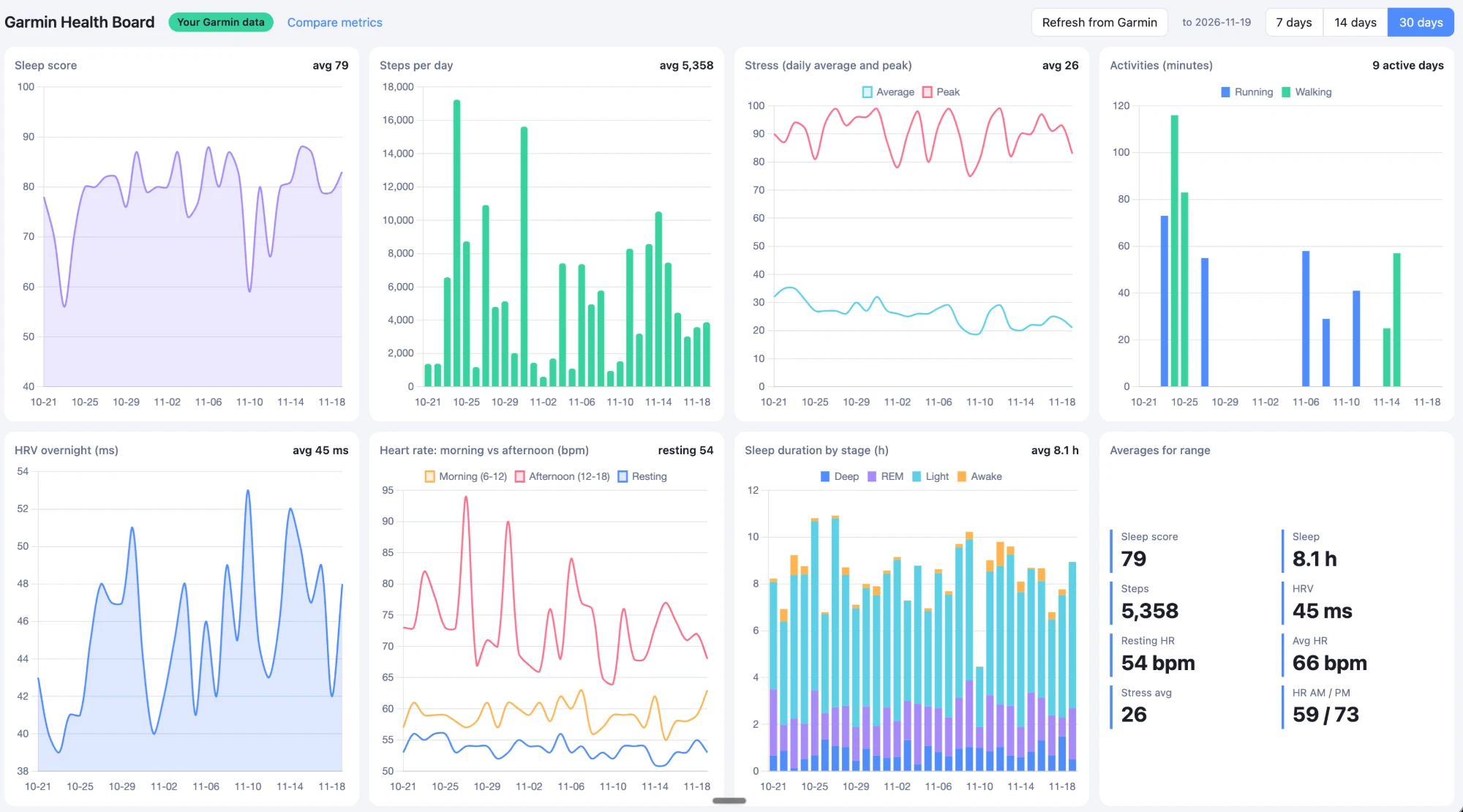
Over the 30 days to Nov 19, 2026, my sleep score averaged 79 and I slept 8.1 hours a night. Overnight HRV averaged 45 ms, resting heart rate was 54 bpm and I walked 5,358 steps a day.
None of this is new. Garmin Connect already shows these charts, so they are table stakes. What changed is that the data sits in my hands: I can reshape it, add a metric, ask a new question and refresh it whenever I like.
Compare sleep, HRV and resting heart rate on one graph
The second page is the one I find more interesting. It has 13 metrics as toggle chips, from sleep score and deep sleep to HRV, resting heart rate, stress and steps. Presets such as Recovery, Stress vs sleep and Movement switch on a sensible group, and you can hover the chart to read the real values.
A score, milliseconds and beats per minute cannot share one axis, so the page rescales them. On the Index scale, 100 equals your own average for the chosen range (7, 14, 30 or 60 days), and every line shows how far each day sits above or below your normal. A normalized 0-100 scale is also available.
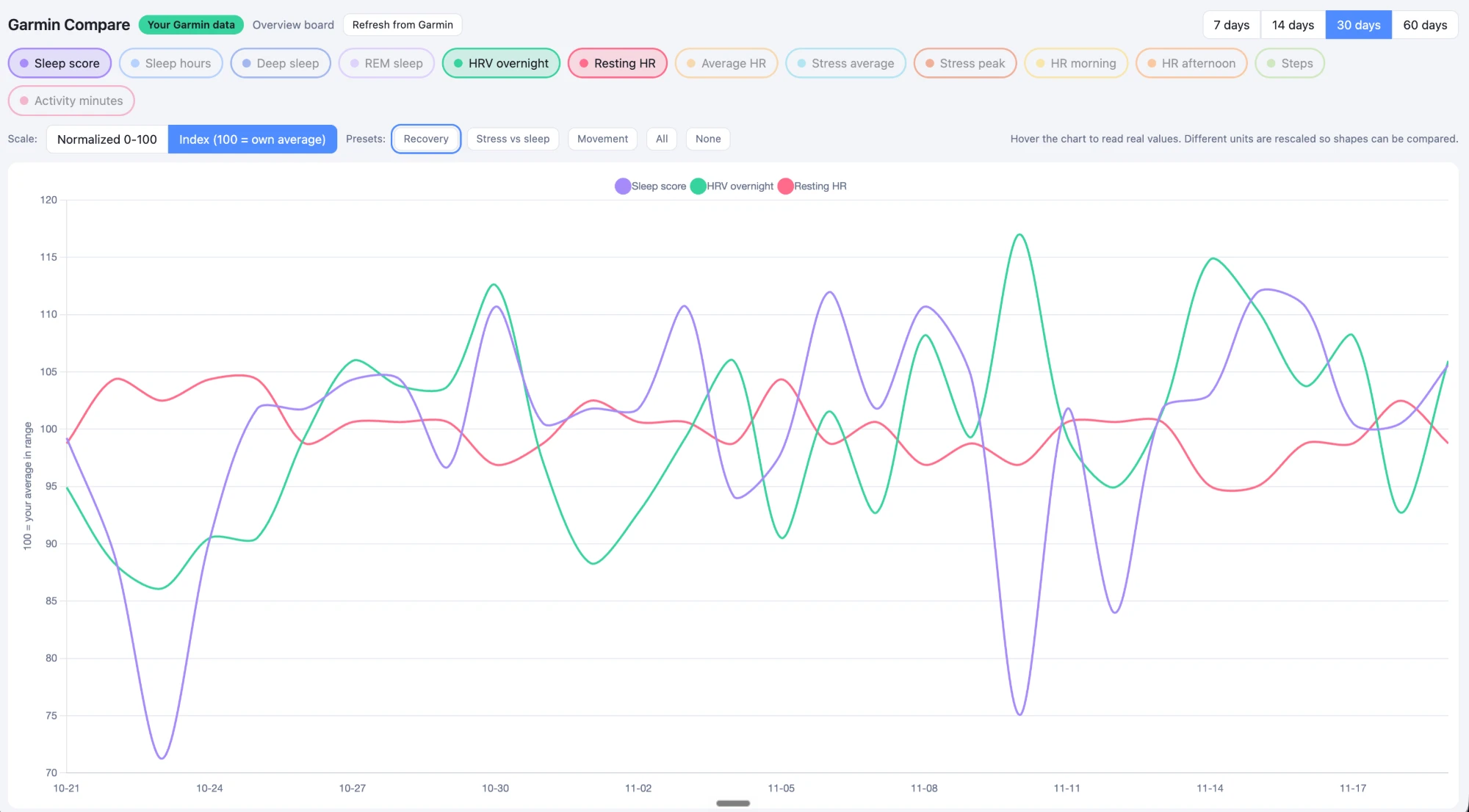
In my Recovery view, resting heart rate stays roughly between 95 and 105 of my average, while sleep score and overnight HRV swing much wider. One chart does not explain why, but it shows where to look first.
What people already build with Garmin data and Claude
A dashboard is only the start. While researching, I found other people pushing the same data much further. These are their projects, and each one links to its source:
- Hidden-pattern discovery. The author of Garmy says Claude connected his all-night coding sessions to worse sleep through HRV and REM, a link he had not spotted himself (Hacker News).
- Personal baselines. A local-first archive compares HRV, resting heart rate, SpO2, sleep, Body Battery and stress against your 90-day baseline and age-adjusted ranges, and flags the days that fall outside (garmin_local_archive).
- Statistics with guardrails. One Claude Code setup includes a garmin-insights skill that refuses comparisons it cannot back up. It flags, for example, that it has only 5 paired nights and needs 8 (Glama).
- An AI endurance coach. garmin-ai-coach writes a training analysis report and a training plan from your data (GitHub).
The guardrails idea stands out to me. My compare chart shows that sleep score and HRV swing, and it cannot tell me whether the swings are related. A tool that counts its paired nights before it answers is a good model for the next step.
Ideas I want to try next
The idea I want to try first is an HRV alert: a message when my overnight HRV drops below its moving average. To me, a drop like that often signals that my body's energy is falling and a cold may be around the corner, so I want the warning early. It is only an idea so far, and I have not built it. Four more are on my list:
- Ask-your-data questions. For example, how my sleep score moves after hard run days. The dashboard already lists my running and walking minutes, so the data is there.
- A morning summary. Sleep, HRV and resting heart rate against my own average, waiting for me each day.
- Bedroom data. I measure CO2, temperature and humidity in my bedrooms with SwitchBot sensors, and I want to put those next to my sleep score.
- Guardrails. Whatever I build should count its paired nights before it answers, the way garmin-insights does.
Garmin Connect will not tell you which of these is worth building. Your own data will. What would you do with yours? Tell me which idea you would try first, or one I missed. You can see more of what I build with AI.
Frequently asked questions
Can you connect Garmin to Claude?
Yes. Garmin Connect has a Personal API Key in its settings, and you can give it to Claude Code to pull your own data. Garmin has no official Claude integration, so community MCP servers and the Garmin data export are the other routes.
Does Garmin Connect have an API?
Yes, for personal use. Garmin Connect settings offer a Personal API Key for your own health and fitness data. Garmin can set and change rate limits, and my key was created on Nov 19, 2026 and expires on Nov 19, 2027.
Can I share my Garmin API key?
No. Garmin's Personal API terms make the key personal: you may not sell, transfer or share it, and you are responsible for all activity under it.
Is it safe to paste the Garmin API key into Claude Code?
It works for a short test, but the key stays in your conversation history. For anything lasting, keep it in a password manager, load it as an environment variable, keep any .env file out of git and delete or rotate the key after tests.
What can you do with Garmin data in Claude?
One prompt built me a dashboard with single metrics and a compare view. Others use Claude for personal baselines, pattern discovery and coaching reports. An HRV alert is my next idea and is not built yet.